By Brian French, Publisher Florida Technology News .com
A practical, start-to-finish playbook for planning, producing, publishing, and repurposing YouTube video content that builds authority, generates leads, and gets your business cited by search engines and AI assistants.
Start With Strategy, Not the Camera
Before you record anything, answer three questions. First, who is the viewer? For most Florida tech businesses this is a local business owner, an IT decision-maker, or a consumer researching a technology purchase — not a fellow engineer. Second, what do you want them to do after watching (call, book a consultation, download a guide)? Third, what question were they asking when they found your video? Every video should map to a real question your customers ask, because that is what YouTube search, Google, and AI answer engines reward.
Build a simple content calendar around three pillars: educational how-to content (the bulk of your library), trust-building content (case studies, client stories, behind-the-scenes), and promotional content (product demos, offers). A healthy ratio is roughly 70% education, 20% trust, 10% promotion.
Style: Formal or Informal?
For a technology business, the sweet spot is professional-casual — informal delivery with professional production. Here’s why:
Formal, scripted, suit-and-tie videos tend to underperform on YouTube because viewers experience the platform as a conversation, not a broadcast. Stiff delivery reads as “corporate ad” and gets skipped. On the other hand, sloppy production (bad audio, cluttered backgrounds) undermines credibility for a company selling technical expertise.
The winning formula for a Florida tech company: speak the way you would explain something to a client across a conference table. Use plain English, contractions, and first names. Wear what you’d wear to a client meeting (branded polo or business casual works well in the Florida market — a suit can actually feel out of place). Keep the energy warm and confident. Lean into local identity where it’s natural: mention the cities and counties you serve, reference Florida-specific realities like hurricane preparedness for IT systems, lightning surge protection, humidity and equipment, or seasonal business cycles. Local specificity builds trust and helps local SEO.
Reserve a more formal tone only for content aimed at enterprise, government, or compliance-heavy audiences (e.g., HIPAA or CMMC topics), and even then, formal should mean “precise,” not “stiff.”
Equipment Suggestions
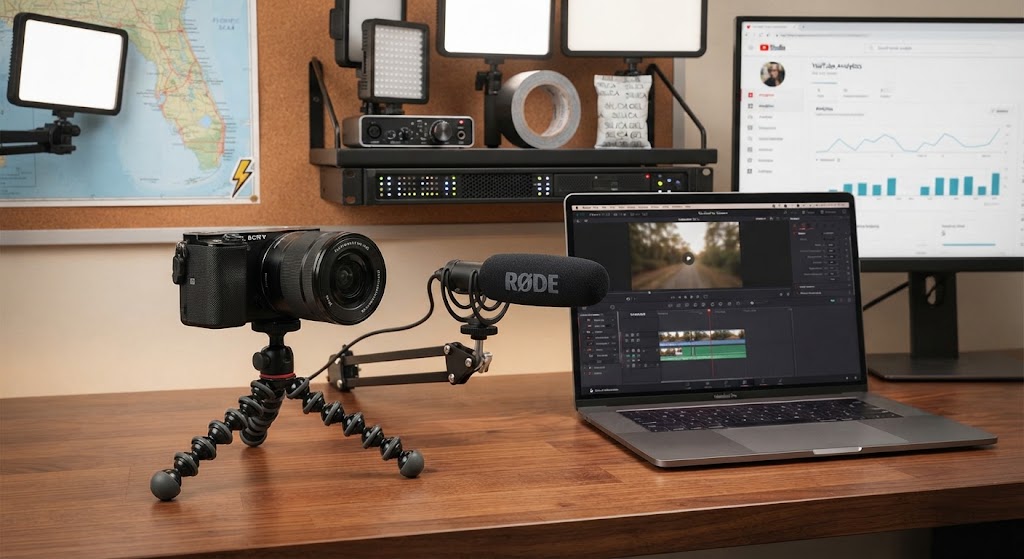
You do not need a studio. You need clean audio, good light, and a stable image — in that order of importance. Viewers forgive average video; they never forgive bad audio.
Starter setup (under ~$500):
- Camera: your current smartphone (iPhone 13+ or comparable Android), shot horizontally in 4K
- Microphone: a wireless lavalier system such as DJI Mic or Rode Wireless GO, or a USB mic like the Samson Q2U for desk videos
- Lighting: one softbox or LED key light (Neewer or GVM kits are inexpensive); position it at 45 degrees to your face
- Support: a basic tripod with a phone mount
- Bonus: a $20 foam panel or even recording in a carpeted, furnished room to cut echo
Intermediate setup (~$1,500–$3,000):
- Camera: Sony ZV-E10 II, Canon R50, or similar mirrorless with a kit or 35mm lens
- Audio: Rode Wireless PRO or a shotgun mic (Rode VideoMic NTG) on a boom
- Lighting: two-light setup (key + fill or key + background light) for depth
- A teleprompter (Elgato Prompter or a tablet-based rig) if you struggle with delivery
Florida-specific tips: if you shoot outdoors for B-roll (your office, client sites, city skylines), shoot early morning to avoid harsh midday sun and afternoon storms; use a windscreen (“dead cat”) on every outdoor mic; and keep silica gel packs in your gear bag — humidity is hard on lenses and electronics.
Narration and On-Camera Delivery Tips
Write a bullet-point outline, not a word-for-word script — unless you use a teleprompter well, reading verbatim sounds robotic. Practice the first 15 seconds until it’s automatic, because that’s where most viewers decide to stay or leave.
Open with the payoff, not your company: “Here are the three things every Tampa business should do before hurricane season to protect their data” beats “Hi, we’re XYZ Technologies, founded in 2009…” Introduce yourself briefly after the hook.
Speak 10–15% slower than feels natural, pause at the end of sentences (pauses make editing easier and sound authoritative), and smile slightly — it audibly warms your voice. Look at the lens, not the screen. If you flub a line, clap once and repeat the sentence; the audio spike makes edit points easy to find. Avoid jargon, or define it immediately: “MFA — that’s the code your phone asks for when you log in.”
If you’d rather narrate over screen recordings or slides, record narration separately in a quiet room, standing up, with the mic 6–8 inches from your mouth, and do two full takes — the second is almost always better.
Editing Best Practices
Keep it tight. Cut every “um,” dead pause, and false start; a 6-minute raw take should become a 4-minute video. Use simple jump cuts rather than fancy transitions — they’re the YouTube norm and keep pacing brisk.
Add captions/subtitles on every video (a large share of viewers watch muted, and captions help accessibility and AEO). Use on-screen text to reinforce key numbers and steps. Insert B-roll, screenshots, or simple graphics every 15–30 seconds during talking-head sections to hold attention. Keep your intro animation, if you use one at all, under 3 seconds — long branded intros kill retention.
Accessible tools: CapCut or DaVinci Resolve (free), Descript (edits video by editing the transcript — excellent for beginners and it auto-generates captions), or Adobe Premiere Pro if you have editing experience. End every video with a verbal call to action plus an end screen (last 10–20 seconds) linking to a related video and your channel subscribe button.
Branding
Consistency compounds. Create a lightweight brand kit and apply it to every video: your logo (a small, unobtrusive corner watermark is fine), two brand colors, one font family, a consistent thumbnail template, and a short standard sign-off line (e.g., “If you’re a South Florida business and want help with this, the link’s below”).
Thumbnails matter more than almost anything else for click-through: use a large, readable 3–6 word text overlay, a human face when possible, and high contrast. Keep the same layout family across videos so your content is recognizable in search results and suggested feeds. Name your channel clearly (business name, optionally plus what you do: “Acme IT — Orlando Managed IT”), write a keyword-rich channel description, and organize videos into playlists by topic (e.g., “Cybersecurity Basics,” “Hurricane IT Prep,” “Microsoft 365 Tips”).
Education vs. Hard Selling
Lead with education. On YouTube, hard-sell content fails twice: the algorithm suppresses it because viewers click away, and the viewers who do watch don’t trust it. Educational content, by contrast, does the selling for you — the person who just learned how to spot a phishing email from your video now sees you as the expert to call.
The practical framework: teach the “what” and the “why” fully and generously; the “how at scale” is your service. Show real value in every video — don’t tease. Then close with a soft, specific call to action: “If you’d rather have someone handle this for your whole team, we do free security assessments for Florida businesses — link in the description.” Reserve direct promotional videos (product demos, offer announcements) for roughly 1 in every 8–10 uploads, and even those should be framed around the customer’s problem, not your feature list.
Case-study videos are the bridge between education and selling: structure them as problem → approach → measurable result, let the client speak if possible, and keep them under 3 minutes.
How Many Videos Per Year?
Consistency beats volume. A realistic, effective cadence for a small-to-mid-size tech business:
- Minimum viable: 2 videos per month = 24/year. Enough to build a searchable library within 12 months.
- Recommended: 1 video per week = ~50/year. This is the sweet spot for compounding search presence without burning out.
- Aggressive: 2+ per week, usually only sustainable with a dedicated hire or agency.
Whatever you choose, batch-record: film 3–4 videos in one half-day session each month. Same setup, same lighting, different shirts if you want them to look like separate days. Batching cuts production time per video by more than half. Supplement long-form uploads with 2–4 vertical Shorts per week cut from your existing footage — Shorts are the fastest way to grow reach with near-zero extra filming.
Commit to a schedule for at least 6–12 months before judging results; YouTube is a compounding asset, and most videos earn the majority of their views after month three.
Optimizing for AEO (Answer Engine Optimization)
AEO means structuring content so that AI assistants (ChatGPT, Claude, Gemini, Perplexity) and Google’s AI Overviews cite and summarize you as the answer. Video is increasingly harvested for these answers via transcripts. Best practices:
- One question, one video. Title videos as the literal question people ask: “How Much Does Managed IT Cost for a Small Business in Florida?” beats “Our IT Pricing Philosophy.”
- Answer in the first 30 seconds. Give the direct, concise answer up front, then expand. AI engines extract these “snippet-style” openings.
- Say the question out loud in the video, then answer it — the transcript becomes machine-readable Q&A.
- Upload accurate captions/transcripts rather than relying on auto-captions; correct technical terms and local place names.
- Use timestamps/chapters with descriptive labels (“02:14 – Average cost per user per month”). Chapters become “Key Moments” in Google results.
- Write structured descriptions: the question, a 2–3 sentence direct answer, chapter list, and links.
- Pair every video with a blog post on your website containing the embedded video, the full transcript or a written version of the answer, and FAQ schema markup (FAQPage and VideoObject structured data). This is the single most powerful AEO move — AI engines cite text pages far more often than raw videos.
- Be entity-consistent: same business name, address, phone, and service descriptions across YouTube, your site, Google Business Profile, and directories, so engines confidently connect your content to your business and your Florida service area.
Answer FAQs — Your Highest-ROI Content
Collect the 20–30 questions your sales and support teams hear most (“Do I really need a firewall?”, “What does IT support cost in Orlando?”, “How fast can you respond after a hurricane?”) and turn each into a 2–4 minute video. FAQ content is the backbone of both YouTube search traffic and AEO because it matches exactly how people query search engines and AI assistants.
Practical formats: a dedicated “FAQ” playlist; short single-question videos titled as the question; and a quarterly “You Asked, We Answered” compilation. Invite viewers to submit questions in the comments — it generates engagement signals and an endless topic pipeline. Don’t dodge pricing questions; videos that give honest ranges (“in Central Florida, expect $X–$Y per user per month, and here’s what moves the number”) build enormous trust and consistently rank.
Republish and Repurpose Everything
Every video should live at least five lives:
- Your website/blog: publish a companion article for each video — embed the YouTube video, include a cleaned-up transcript or rewritten article version, add an FAQ section with schema markup, and interlink related posts. This boosts SEO, AEO, and time-on-site.
- Local and industry media: submit or syndicate your videos to Florida-focused video and news platforms such as Florida Video News (https://www.floridavideonews.com) to reach a regional audience and earn backlinks. (Please verify the site’s current submission process and terms directly — I can’t confirm live details of external sites.) Also consider local business journals, chamber of commerce newsletters, and Florida tech community groups.
- Social media: cut 30–60 second vertical clips for YouTube Shorts, Instagram Reels, TikTok, Facebook, and LinkedIn (LinkedIn is essential for B2B tech — upload natively rather than linking out, and add a text hook in the first line of the post). One long video should yield 3–6 short clips.
- Email: feature each new video in your newsletter with a thumbnail linking to the blog post version (driving traffic to your site, not just YouTube).
- Sales enablement: have your team send relevant FAQ videos in proposals and follow-up emails — “you asked about backup; here’s a 3-minute video we made on exactly that.”
- Google Business Profile: post video clips and links there too; it strengthens local search presence.
Additional Best Practices
Measure what matters. Watch three metrics in YouTube Studio: click-through rate on thumbnails (aim for 4%+), average view duration/retention (find where people drop off and fix that pattern in future videos), and — most importantly — leads. Use UTM-tagged links and ask “How did you hear about us?” so you can attribute revenue to video.
Legal and compliance: get signed releases before featuring clients or employees; be careful with claims (“guaranteed,” “most secure”) that could invite scrutiny; if you serve regulated industries, have compliance-sensitive scripts reviewed; and only use licensed music (YouTube’s Audio Library, Epidemic Sound, or Artlist).
Engage in the first 24 hours: reply to every comment on new videos; early engagement signals boost distribution, and comment replies often surface your next FAQ topic.
Ride Florida’s calendar: publish hurricane-prep IT content in April–May (before season), budget-planning content in Q4, and tie content to local events and business seasons in your market.
Don’t chase virality. A video with 300 views that generates two consultations from Broward County businesses is a wildly successful marketing video. Optimize for the right viewers, not the most viewers.
Quick-Start 90-Day Plan
Month 1: define pillars, list 25 FAQs, buy the starter kit, set up your channel branding, batch-record and publish your first 4 FAQ videos with companion blog posts. Month 2: continue weekly publishing, start cutting Shorts, submit your best video to regional platforms, add FAQ/Video schema to your blog posts. Month 3: review retention and CTR data, refine thumbnails and hooks, record your first client case study, and lock in your 12-month calendar.
Consistency, clean audio, genuine helpfulness, and relentless repurposing — that’s the whole game.
About the Author